It's important to verify the controller is connected to a compatible modem. It's also important to verify that the modem is compatible with the controller firmware type and version. For example, it won't work to use an Orbital 2G modem if the controller runs with a firmware type and version that is developed for 4G modem connection.
Orbital 2G modems
Blue 2G modem
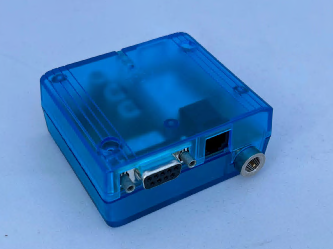
The red LED indicates the power control and the status of the micro controller.
| Operating status of the controller | LED mode | Description |
| Sleep mode | Off | Power supply connected, but not switched on |
| Ignition | flashing | The engine is switched on. The communication via the serial interface will be active after a few seconds. |
| Active mode | off | The red LED is off. Usually, the yellow LED is flashing (Table 8: Coding of the yellow LED). |
| Standby mode | on | The duration of the Standby Mode is roundabout 30 seconds. If an ignition signal occurs (an active signal edge at pin 3 of the Western jack (5.4 26BTurn on) or an active edge on DTR (5.6.1.1 5BDTR - Data terminal ready)) the engine is activate immediately |
The yellow LED
| Permanently off | Modem is in one of the following modes:
|
| 600 ms on / 600ms off | Limited network service: No SIM card inserted or no PIN entered, or network search in progress, or ongoing user authentication, or network login in progress. |
| 75 ms on / 3 s off | IDLE mode: The mobile is registered to the GSM network (monitoring control channels and user interactions). No call is in progress. |
| 75 ms on / 75 ms off / 75 ms on / 3 s off | One or more GPRS PDP contexts activated. |
| 500 ms on / 50 ms off | Packet switched data transfer is in progress Permanently on Depending on type of call:
|
Black modem
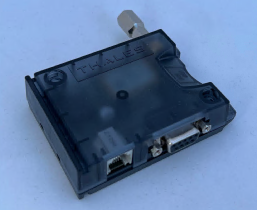
A green LED indicates whether the BGS2T is ready to operate.
The red LED indicates the power control and the status of the microcontroller.
| Permanently off | BGS2T is in POWER DOWN mode |
| 600 ms on / 600 ms off: | Limited Network Service: No SIM card inserted or no PIN entered, or network search in progress, or ongoing user authentication, or network login in progress. |
| 75 ms on / 3 off: | IDLE mode: The mobile is logged to the network (monitoring control channels and user interactions). No call in progress. |
| 75 ms on / 75 ms off / 75 ms on / 3 s off | One or more GPRS contexts activated |
| 500 ms on / 25 ms off | Packet switched data transfer in progress. |
| Permanently on | Connected to remote party or exchange of parameters while setting up or disconnecting a call. |
Orbital 3G and 4G modems
Yellow modem
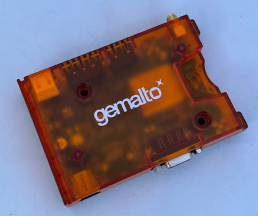
Green LED (Power ON/OFF): Indicate whether the terminal is ready to operate and reports certain watchdog operations.
Orange LED (Network Status):
| 10 ms on / 1990 ms off | data transfer |
| 10 ms on / 3990 ms off | registered to a network. No call, no data transfer |
| 500ms on / 500 ms off: | limited network service (e.g. because no SIM/ USIM, no PIN or during network search) |
Was this article helpful?
That’s Great!
Thank you for your feedback
Sorry! We couldn't be helpful
Thank you for your feedback
Feedback sent
We appreciate your effort and will try to fix the article