How to switch to Onomondo SIM card (TMC-3 controller)
To switch from the current SIM card to Onomondo SIM card it is necessary to update the communication settings in the TMC-3 controller.
Settings to enter
| Setting | Value |
| APN (string 00) | onomondo |
| HNI (string 01) | Leave blank, or 0,0, or "0,0" — depends on firmware and modem (see table below) |
You can update these settings in one of two ways:
- via a PC using the TMC-3 Configurator
- and for some firmware types also through the controller display (if the menu fields are available)
Initial Step
Insert the Onomondo SIM card into the modem.
Update SIM settings via PC (TMC-3 Configurator)
If the Setup/String menu is not available on the display:
Connect a PC to the controller with an Ethernet cable (USB-Ethernet adapter if needed).
Open the TMC-3 Configurator software.
Enter the Onomondo settings:
- String 0 (APN): onomondo or "onomondo"
- String 1 (HNI):
Leave blank or 0,0 or "0,0"(three options depends on firmware and modem combination)
- After writing the new strings, confirm them by clearing the textbox and read them back. Like shown in the video.
Power-cycle the controller using the main switch.
Wait for the SIM card to perform network registration. The process can take anywhere from a few minutes to several minutes.
* if above steps fails, please load default modem strings on the controller (under Setup/Config/GSM Modem Strings To Default) and redo from step 3.
When the controller appears online in OrbiSCADA, the SIM update is complete.
Update SIM card settings via the TMC-3 display
If the Setup/String menu is available through the TMC-3 controller display (depends on the firmware version):
Make sure you have access level 2.
Go to Setup → String.
- Enter the Onomondo settings:
- String 0 (APN): onomondo or "onomondo"
- String 1 (HNI):
Leave blank or 0,0 or "0,0"(three options depends on firmware and modem combination)
Power-cycle the controller using the main switch.
Wait for the SIM card to perform network registration. The process can take anywhere from a few minutes to several minutes.
* if above steps fails, please load default modem strings on the controller (under Setup/Config/GSM Modem Strings To Default) and redo from step 3.
When the controller appears online in OrbiSCADA, the SIM update is complete.
Optional – use the TMC-3 display to verify communication
After updating the APN and HNI (via display or PC), you can confirm that the modem is behaving normally:
Open the Monitoring menu on the TMC-3.
Locate the modem status screen
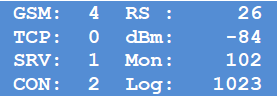
Check that the Logging value increases by 1 every minute.
Check that modem status indicators show normal activity.
Was this article helpful?
That’s Great!
Thank you for your feedback
Sorry! We couldn't be helpful
Thank you for your feedback
Feedback sent
We appreciate your effort and will try to fix the article